
Create Reference Lamps#
As a secondary tool now the goodman pipeline package includes a new shell script
redspec-create-reference-lamp that helps to create reference lamps using an
interactive plot.
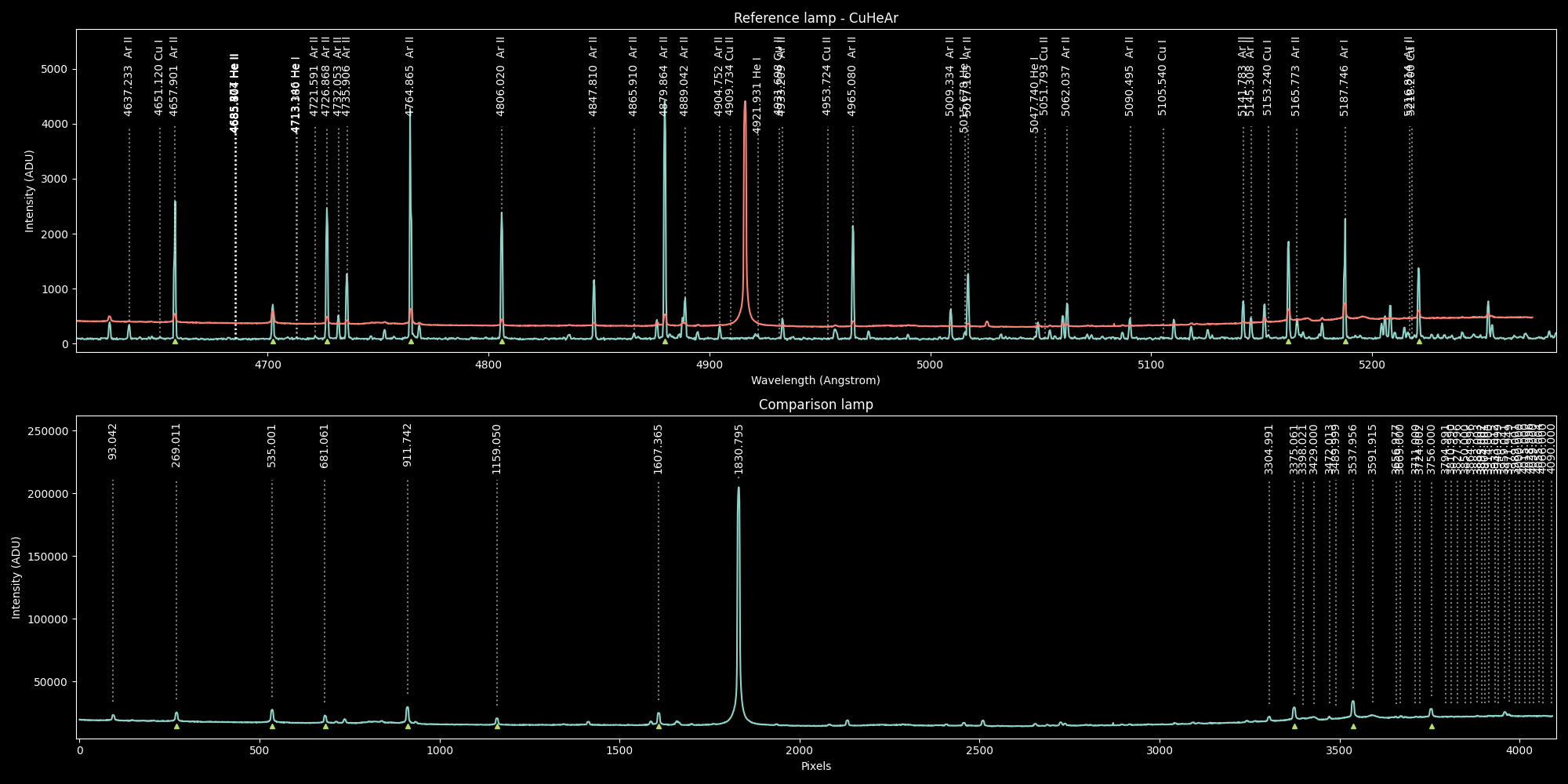
Process Overview#
First of all, a reference lamp is the spectrum of a lamp that contains known spectral lines and it has a wavelength solution, so those lines are actually identified and the entire spectral axis is well defined.
The goodman-pipeline package uses reference lamps as templates to solve other lamps in the same
instrument configuration or mode.
Important
We call reference lamps the lamps that can be used to calibrate other lamps and comparison lamp just any lamp, specially those without wavelength calibration.
So, what redspec-create-reference-lamp does is to help in the creation of a properly formatted
reference lamp, starting from a comparison lamp and a reference lamp. Once the process has ended you
will have a new reference lamp.
The comparison lamp must be a 1D spectrum, ideally extracted using the goodman pipeline package since it will contain important metadata for traceability. If those keywords are not present they will be added but with empty or default values.
First the script will try to find a matching reference lamp from the package’s library of reference lamps, if there is no direct match it will display a list of lamps that could be compatible and gives the command to use.
The user could select any other reference lamp right away.
Then, the user must find the matching pattern and identify each line on either side and when the scripts detects the right amount of data points it will calculate the wavelength solution and overplot the wavelength calibrated comparison lamp over the reference lamp. This helps to corroborate and find more matches.
Once the user is satisfied can save the newly calibrated reference lamp.
Important
The newly calibrated reference lamp will be saved in the same folder of its parent file. i.e. the same folder as the comparison lamp.
Reference Lamp Selection#
As it was said before, the goodman pipeline comes with a library of reference lamps and with tools to sort them out. All goodman comparison lamps come with a set of keywords that contain the information of all the lamps status, for instance, a copper lamp should have the following section in its header:
LAMP_HGA= 'FALSE'              / Hg(Ar)
LAMP_NE = 'FALSE'              / Neon
LAMP_AR = 'FALSE'              / Argon
LAMP_FE = 'FALSE'              / Iron
LAMP_CU = 'TRUE'               / Copper
LAMP_QUA= 'FALSE'              / Quartz
LAMP_QPE=             0.000000 / Quartz Percent
LAMP_BUL= 'FALSE'              / Bulb
LAMP_DOM= 'FALSE'              / Dome
LAMP_DPE=             0.000000 / Dome Percent
This indicates that the cooper lamp was on.
Note
The copper lamp actually contains Copper, Helium and Argon (CuHeAr). The same for Iron, it contains Iron, Helium and Argon (FeHeAr)
So, in order to select the best lamp, the script will first try to find an exact match of the lamp
keywords. More precisely, LAMP_HGA, LAMP_NE, LAMP_AR, LAMP_FE and LAMP_CU.
Then, it will filter out all the reference lamps that do not contain the theoretical central wavelength for the comparison lamps. If there are more than one lamps that pass this test it will estimate the wavelength range for each reference lamp and for the comparison lamp and will select the one with with the most similar range to the comparison lamp’s.
Controls & Commands#
The window is a matplotlib’s pyplot plot and makes use of its interactive capabilities.
For selecting a line press Control + Click. Then a smaller plot will pop up, use Left and Right arrow to adjust the selection to the best apparent line center. Press Enter to confirm your selection and Escape to cancel.
For the reference lamp, if there is a NIST line nearby you can match it to the closest one using the m key.
Note
Always rely on the help provided interactively. h will print a contextual help.
To save the resulting reference lamp use w.
Mathematical Model#
The only supported model is Chebyshev of order 3.
From experience, this is usually the best model for Goodman HTS’s spectra.